Your EPA Method 9 Opacity Reference Tool
OpaciTool is a patent-pending application that uses Augmented Reality (AR) to streamline EPA Method 9 opacity observations. It enables users to compare the opacity of visible emissions directly with the known opacity of an AR object displayed on your phone. No more guessing the correct opacity!
- For use with all emission colors and types
- Saves images with selected opacity and reference scale for evidence and proof of accuracy
- Calculates a real-time rolling average of opacity
- Enables quick & easy generation of test reports
- Offers unlimited access to a comprehensive smoke school lecture course
- Backed by a Midwest-based team with over 50 years of expertise in smoke school training
- For Apple iOS and Android devices
Free Trial
Access all of OpaciTool's features during the 30 day free
trial!
✓ No Credit Card Required!
How it Works - OpaciTool Application
OpaciTool is an application and reporting tool that uses your mobile device to assist with EPA Method 9 observations. It can be used on any smoke color for tests ranging from 1 minute to 3 hours. Match the opacity of the OpaciTool scale to the opacity of the emissions in the scene for an accurate reference. Data and screenshots are recorded for easy report generation. The OpaciTool app is available for most Android and Apple devices.
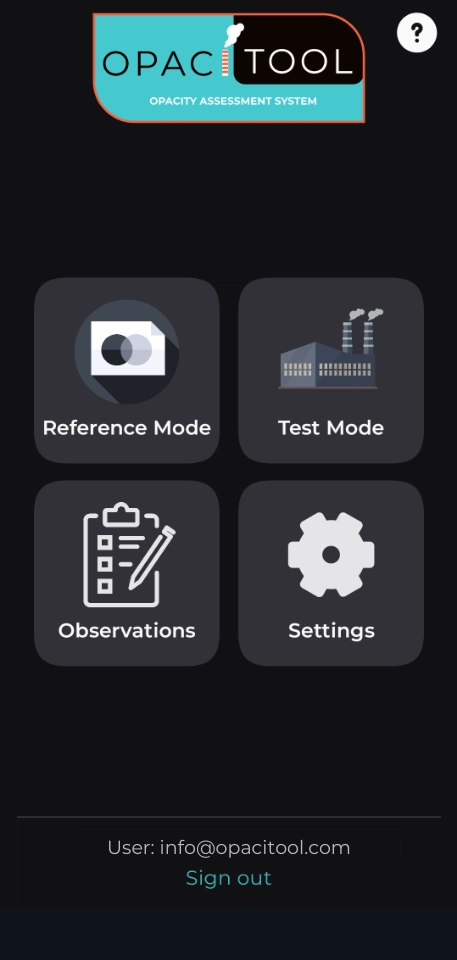
Select the Mode
OpaciTool has two modes of operation; reference mode and test mode. Reference Mode allows you to quickly compare visible emissions to the OpaciTool scale. Test Mode allows you to perform timed tests and automatically record screenshots, GPS data and facility information.
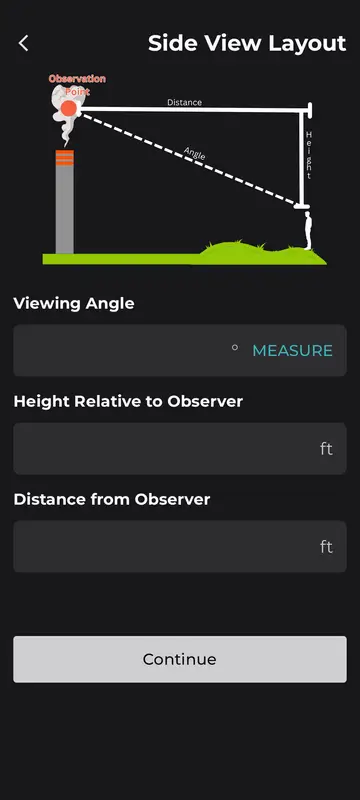
Data Input
OpaciTool allows you to input data that will be used for test report generation such as facility and process information. It can measure viewing angle, direction and automatically load weather data. The frequency of observations, test duration and averaging period can be input to meet your test requirements.

Match OpaciTool to the Emissions
Position the OpaciTool scale next to the emissions in the scene and adjust its color and opacity to match. The scale's opacity is mathematically-calculated, ensuring a visually-precise reference. All you need to do is ensure the opacity of the scale matches the opacity of the emissions. The selected opacity and screenshots will be automatically recorded at the specified observation frequency.

Upload Data
When testing is complete, data and screenshots will be uploaded to your online Dashboard. The Dashboard allows you to revise data, input additional data and create reports from Reference Mode and Test Mode data.
How it Works - OpaciTool Dashboard
When you have completed testing with the OpaciTool app, test data is sent to your online Dashboard where you can access, revise and review your data and prepare and print test reports.
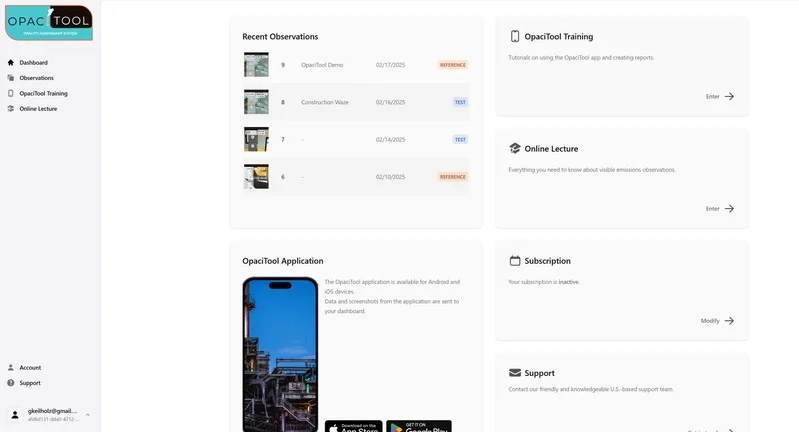
Dashboard Features
Each subscription includes unlimited access to the Dashboard. The Dashboard is where you can access OpaciTool tutorials, subscription info, a comprehensive smoke school lecture course and all of the test data collected with the OpaciTool app.
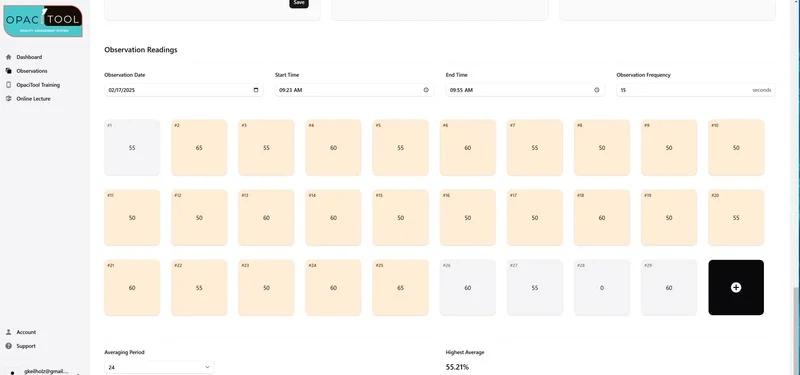
Observation Data
When your test data is uploaded, an Observation is created. You can review and revise test data as well as recorded screenshots. The average opacity is automatically calculated and displayed. Additionally, a video from your viewing position can also be viewed.
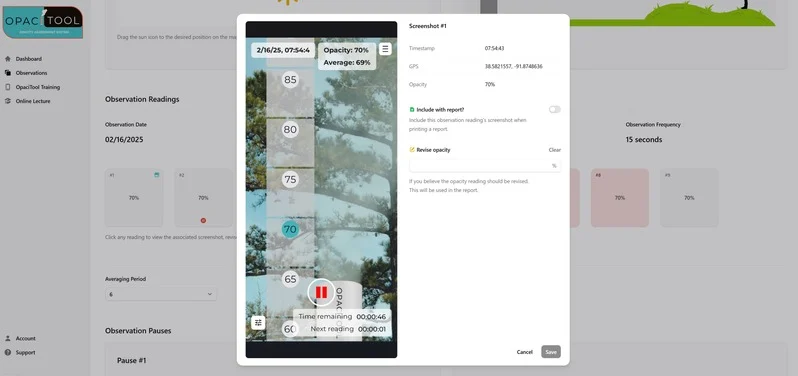
Screenshots from OpaciTool
You can review screenshots recorded during the EPA Method 9 test and the associated opacity. If needed, the opacity of an observation can be revised. The opacity of each reading is automatically input into a data report. The GPS location and time are also stored for each observation.
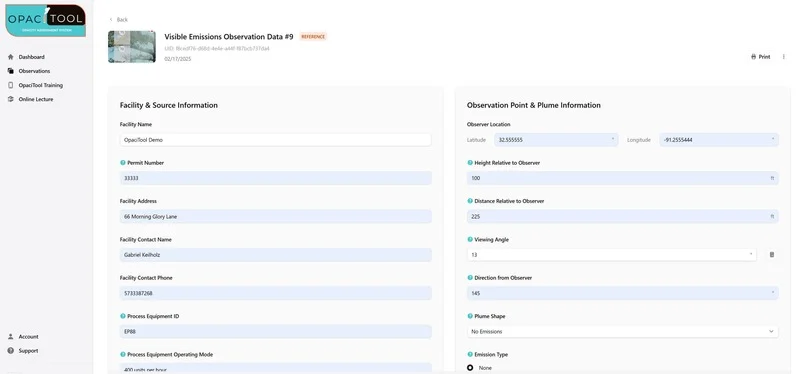
Report Generation
A printable report can be generated for each Observation, including facility data, opacity readings and averaging details. Users can add as many screenshots as needed to the report. Observation data and reports are stored in your Dashboard as long as your account is active. Reports and screenshots can be downloaded for your records.
Benefits of OpaciTool
Having a digital reference for opacity observations isn't the only benefit of OpaciTool. The following are some of the other key benefits of OpaciTool.
-
Accuracy
Instead of relying solely on memory, OpaciTool allows users to compare emissions to a mathematically-calculated reference scale.
-
Repeatability
OpaciTool's reference scale is mathematically-calculated and does not change based on external or environmental conditions.
-
Evidence
OpaciTool's screenshots display the reference scale and emissions in the same scene - proving the opacity reading was visually accurate.
-
Automated Reporting
OpaciTool streamlines the data collection for complete and accurate EPA Method 9 test reports.
-
Unlimited Smoke School Lecture
Access our comprehensive smoke school lecture anytime. Includes interactive elements, videos, quizzes and printable certificates.
-
Affordable Insurance
OpaciTool is a reference tool and gives your EPA Method 9 observations more credibility by providing visual evidence in your reports.
Affordable Subscription Options
All of our subscription options unlock all features of the OpaciTool system. All plans start with a 30-day free trial. No credit card required.
Monthly
6 Months
$150 billed once
12 Months
$240 billed once
Group Pricing
For 5 or more users
Need help choosing? Contact our sales team
Frequently Asked Questions
Can OpaciTool be used as a replacement for EPA Method 9?
No, OpaciTool complements a certified EPA Method 9 observer. Users must be certified through an in-person or VR smoke school.
What’s included with the Free Trial?
EVERYTHING! The free trial is a full-access trial. You will receive the same benefits as a paid subscriber. You do not need to input credit card info for the free trial.
Why doesn’t OpaciTool match the opacity at certain smoke schools?
The device that measures smoke at smoke school is measuring the “in-stack” opacity. This can vary from the “visual opacity” because in-stack light conditions don’t always match outside light conditions. OpaciTool measures the “visual opacity”, just like you do during a EPA Method 9 observation.
How Do I Get Started?
First, sign up for the free trial and create your account. Second, sign-in to the online Dashboard and review the tutorials and online lecture (if needed). Third, download the app to your device and begin using.
Will OpaciTool work with my device?
The OpaciTool application is available for most Android and Apple iOS devices.
Can I use OpaciTool in my state?
Yes, OpaciTool is a tool for a certified EPA Method 9 observer and can be used anywhere. You must still follow your state requirements for EPA Method 9 certification.
Still have questions?
Contact UsContact Us
Our experienced and innovative U.S. team has more than 45 years of combined smoke school training experience. We are experienced in all visible emissions certification methods including:
- In-Person Smoke School (EPA Method 9, 203a, 203b and 203c)
- Virtual Reality (VR) Smoke School (ALT-152)
- Digital Opacity Camera System (DOCS - ALT-082)
OpaciTool represents the next evolution in enhancing visible emissions observations, serving as the ultimate tool for certified opacity evaluators.
If you have any questions regarding OpaciTool, please fill out the form and we will respond promptly.

Built & Based in the U.S.A.